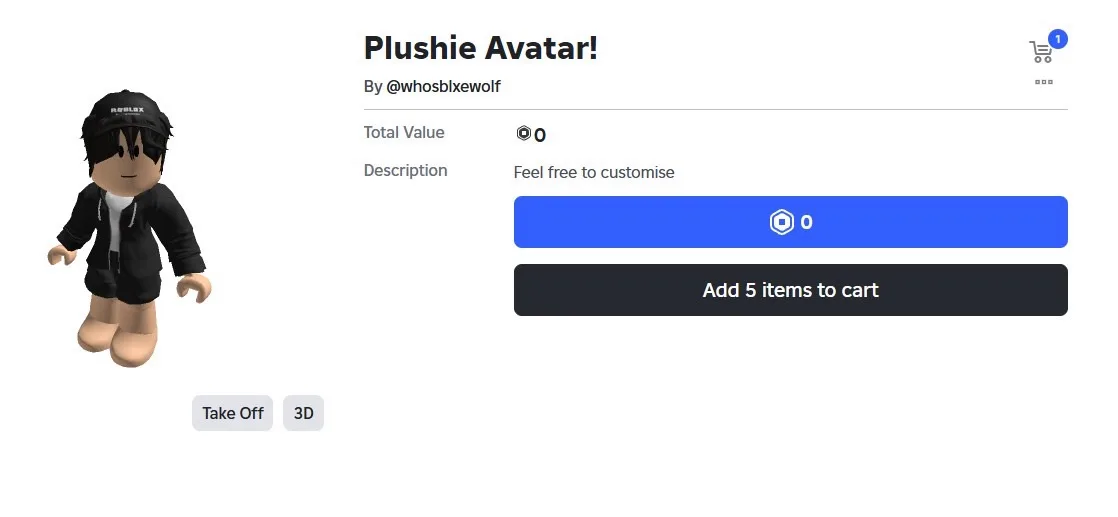
Roblox offers thousands of avatar customization options, and one of the cutest styles available is the Mini Plushy Avatar Body. Its compact size and soft, toy-inspired design make it a popular choice for players who enjoy creating unique and adorable avatars.
The best part is that, when offered as a free item, you can add it to your inventory without spending any Robux. In this guide, we’ll explain how to claim the Mini Plushy Avatar Body, customize it, and make the most of its features.
Note: Free avatar items may become unavailable or change over time. Always check the official Roblox Marketplace for the latest availability.
What Is the Mini Plushy Avatar Body?
The Mini Plushy Avatar Body is a character bundle designed to give your Roblox avatar a smaller, plush toy-like appearance. Unlike the default Roblox body, this style has a compact look that pairs well with a variety of clothing and accessories.
Many players use it to create:
- Cute-themed avatars
- Anime-inspired characters
- Casual everyday outfits
- Fantasy-inspired designs
- Creative roleplay characters
Its versatility makes it suitable for both free and premium avatar collections.
Features of the Mini Plushy Avatar Body
Some of its popular features include:
- Free to claim when available
- Compact and adorable appearance
- Compatible with many avatar accessories
- Works with a wide range of clothing styles
- Easy to personalize
Because of its unique proportions, many accessories look different compared to standard Roblox avatars.
How to Claim the Mini Plushy Avatar Body
If the item is currently available, claiming it is simple.
Follow these steps:
- Sign in to your Roblox account.
- Visit the official Roblox Marketplace.
- Search for the Mini Plushy Avatar Body or use the official item page provided by the creator.
- Open the item’s page.
- If it’s listed as free, select Get or Get Now.
- Confirm the transaction.
Once completed, the avatar body will be added to your inventory.
How to Equip the Avatar Body
After claiming the item:
- Open Avatar.
- Go to Characters or Body, depending on your device.
- Select the Mini Plushy Avatar Body.
- Equip the bundle.
Your Roblox character will immediately switch to the new appearance.
Adjust Body Settings
Some avatar bundles look better with certain body settings.
If customization options are available:
- Open Avatar.
- Navigate to Body.
- Adjust body proportions if needed.
- Preview the changes before saving.
Experimenting with different settings can help create a more balanced look.
Customize Your Plushy Avatar
One of the best parts of Roblox is personalization.
You can customize your new avatar by adding:
- Hairstyles
- Hats
- Glasses
- Back accessories
- Shoes
- Layered clothing
- Faces
- Emotes
Try different combinations to create an avatar that matches your own style.
Choose an Idle Animation
Animations can make your avatar feel more natural.
To change your idle animation:
- Open Avatar.
- Select Animations.
- Choose an idle animation you like.
- Save your changes.
Different animations can give your character a playful, relaxed, or energetic personality.
Tips for Creating a Cute Avatar
If you’re aiming for a plush-inspired appearance, consider these ideas:
- Use pastel or neutral-colored clothing.
- Add simple hairstyles.
- Choose small accessories instead of oversized ones.
- Match your outfit colors.
- Avoid cluttering the avatar with too many items.
Sometimes a simple design creates the best overall appearance.
Stay Safe When Claiming Free Items
Whenever free Roblox items become popular, unofficial websites often appear claiming to offer exclusive rewards.
Protect your account by following these safety tips:
- Only claim items through the official Roblox website or app.
- Never enter your Roblox password on third-party websites.
- Avoid offers that promise free Robux in exchange for personal information.
- Verify Marketplace links before opening them.
- Enable two-step verification to improve account security.
Legitimate free avatar items never require your account password outside Roblox.
Frequently Asked Questions
Is the Mini Plushy Avatar Body free?
If it’s listed as a free item in the official Roblox Marketplace, you can claim it without spending Robux.
Can I customize the avatar body?
Yes. You can use different clothing, accessories, hairstyles, faces, and animations to personalize your character.
Does it work with layered clothing?
Many layered clothing items are compatible, although the appearance may vary depending on the specific item.
Will the avatar body stay free forever?
Not necessarily. Creators can change pricing or remove items from the Marketplace at any time.
Where should I claim the item?
Always use the official Roblox Marketplace or an official creator link to ensure you’re getting the legitimate item.
Final Thoughts
The Mini Plushy Avatar Body is a fun way to give your Roblox character a fresh and adorable appearance. Its compact design works well with many outfits and accessories, making it a great choice for players who enjoy customizing their avatars.
If the bundle is currently available for free, be sure to claim it through the official Roblox Marketplace before its availability changes. With the right accessories and animations, you can create a unique avatar that stands out in any Roblox experience.