
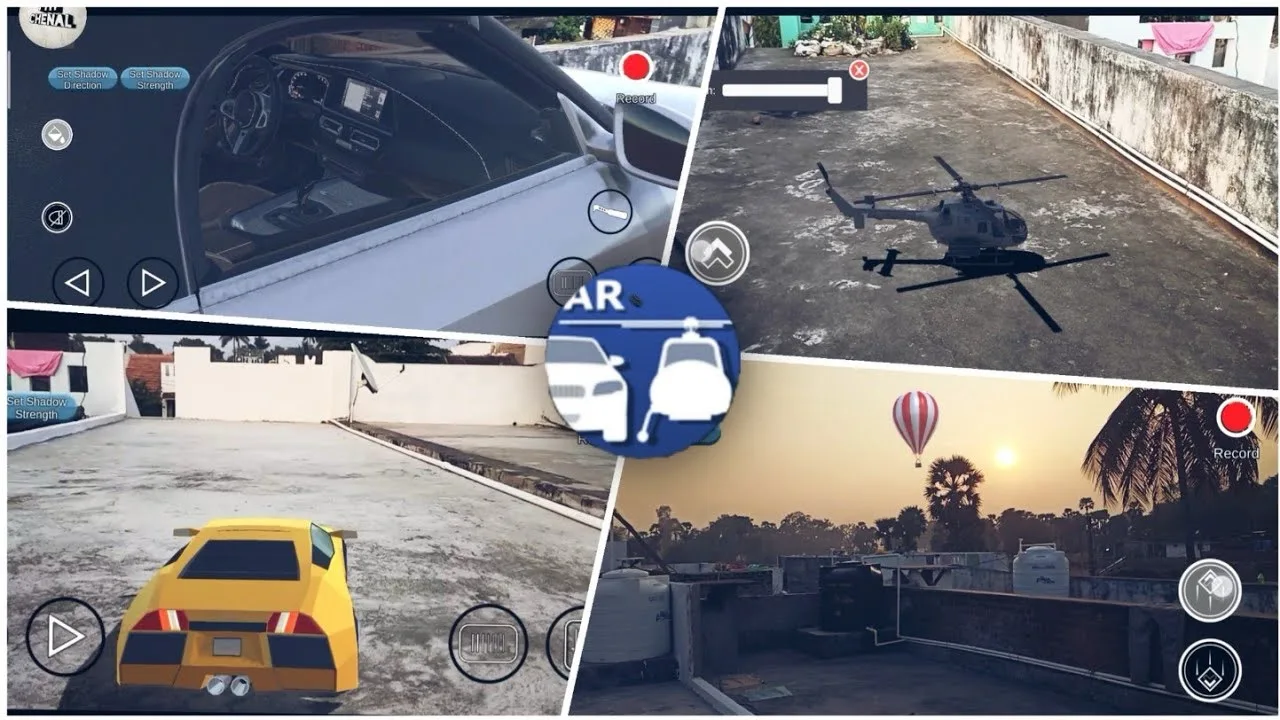
If you’re looking for a driving game that’s different from traditional racing simulators, AR Real Driving offers a unique experience. Instead of driving through virtual roads, the game uses Augmented Reality (AR) to place 3D vehicles into your real-world surroundings through your smartphone’s camera.
Whether you’re driving a sports car across your living room or flying a helicopter over your desk, AR Real Driving combines mobile gaming with augmented reality technology to create an interactive experience.
In this guide, you’ll learn about the game’s features, supported devices, gameplay, and what makes it different from other driving simulators.
What Is AR Real Driving?
AR Real Driving is a mobile simulation game that uses your phone’s camera and augmented reality technology to project virtual vehicles onto real-world surfaces.
Once the game detects a flat area, you can place vehicles into the environment and control them using on-screen controls. Instead of exploring a traditional game map, you become part of the gameplay.
The game is available for both Android and iPhone, although device compatibility depends on AR support.
How Does the Gameplay Work?
Getting started is simple.
After launching the game, the camera scans your surroundings to detect flat surfaces. Once a suitable area is found, you can place a virtual vehicle into the scene and begin driving.
Players can:
- Drive cars across real surfaces.
- Control helicopters in AR mode.
- Move around the environment while viewing the vehicle from different angles.
- Enjoy interactive gameplay using their phone’s camera.
Every room, table, or outdoor space becomes a new location to explore.
Main Features
AR Real Driving includes several features designed to make the experience more immersive.
Augmented Reality Driving
The game’s biggest feature is its AR technology, allowing virtual vehicles to appear naturally within your surroundings.
Multiple Vehicles
Players can choose from different vehicles, including cars and helicopters, depending on the available content in the game.
Helicopter Mode
In addition to driving, some versions include helicopter controls for players who want to experience flying in augmented reality.
Realistic Audio
Engine sounds and vehicle effects help make the simulation feel more engaging while driving or flying.
Beginner-Friendly Controls
Simple touch controls make the game accessible for both new and experienced mobile gamers.
Device Requirements
Because the game relies on augmented reality, your device must support AR technology.
Typical requirements include:
Android
- Android 7.0 or later
- ARCore-compatible device
- Camera access enabled
iPhone
- iOS 11 or later
- ARKit-supported device
- Camera permission enabled
Performance may vary depending on your phone’s hardware.
Why Players Enjoy AR Real Driving
Unlike traditional driving games, AR Real Driving blends virtual gameplay with your real environment.
Players enjoy the game because it offers:
- A different driving experience every time.
- Interactive augmented reality gameplay.
- Real-world exploration using virtual vehicles.
- Easy-to-use controls.
- A fun way to experience AR technology.
Since your surroundings become part of the game, no two sessions feel exactly the same.
Tips for the Best AR Experience
To improve gameplay, try these simple tips.
Use a Well-Lit Area
Good lighting helps your device detect surfaces more accurately.
Choose Flat Surfaces
Tables, floors, and open spaces usually provide the best tracking performance.
Move Slowly
Allow your phone enough time to recognize the environment before placing a vehicle.
Keep Your Camera Clean
A clean camera lens improves image tracking and overall AR accuracy.
Check Device Compatibility
If the game doesn’t function correctly, verify that your smartphone supports ARCore (Android) or ARKit (iPhone).
Is AR Real Driving Suitable for Beginners?
Yes.
The controls are straightforward, making it easy for new players to start driving almost immediately.
Since there are no complicated mechanics to learn, players can focus on exploring augmented reality and experimenting with different vehicles.
Frequently Asked Questions
Is AR Real Driving free?
Availability may vary depending on your platform and region. Check the official app store for the latest pricing and download information.
Does the game require internet access?
Some features may work offline, while others could require an internet connection depending on the current version of the game.
Can I play without AR support?
No. Since the game is built around augmented reality, your device must support the required AR technology.
Does it work on both Android and iPhone?
Yes, provided your device meets the game’s minimum hardware and software requirements.
What makes AR Real Driving different?
Instead of driving through a virtual map, the game places vehicles into your real-world environment using your smartphone’s camera, creating a unique augmented reality experience.
Final Thoughts
AR Real Driving offers a creative twist on traditional driving games by combining realistic vehicle models with augmented reality technology. Rather than following fixed tracks or racing circuits, you can turn your home, office, or outdoor space into a virtual driving environment.
If your smartphone supports AR and you’re looking for something beyond standard racing games, AR Real Driving is an entertaining way to experience mobile gaming from a completely different perspective.